
How to Grow Instagram Followers?
November 20, 2025
Instagram Story Tricks Every Creator Should Know
December 2, 2025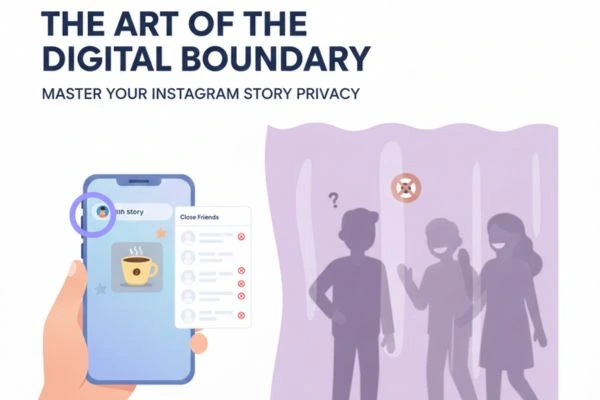
We have all been there. You snap the perfect photo of your brunch mimosa, or perhaps a slightly chaotic late-night selfie, and your thumb hovers over the “Your Story” button. But then, a thought intrudes.
Does my boss really need to see this? Is my judgmental aunt going to make a passive-aggressive comment about my weekend plans? Do I really want my ex keeping tabs on who I’m hanging out with?
Instagram Stories are fantastic for sharing fleeting moments of our lives. They are less curated than our main feed, offering a raw, authentic glimpse into our day. But that authenticity sometimes clashes with the reality that our Instagram following is a melting pot of different social circles. We have colleagues, family members, close friends, acquaintances, and frenemies all mixed into one audience pool.
Sometimes, you want to share something, but not with everyone.
The good news is that Instagram understands this nuance. You don’t have to commit to a fully private profile just to keep certain moments away from certain eyes. You don’t have to block people, causing awkward real-world drama, just to enjoy some digital peace.
This comprehensive guide will walk you through every method available to hide your Instagram Stories from specific people. We will cover the direct “Hide” feature, the strategic use of the “Close Friends” list, and the differences between hiding, blocking, and restricting.
Let’s take back control of your audience.
Why Bother Hiding Stories? The Psychology of Digital Boundaries
Before we dive into the “how-to,” it’s worth validating the “why.” Some people feel guilty about hiding their stories, as if they are being secretive or shady.
Get rid of that guilt right now.
Setting boundaries is healthy, both in the real world and the digital one. You wouldn’t invite your boss into your living room while you’re lounging in pajamas watching reality TV on a Sunday morning. Why should your digital living room (your Stories) be any different?
Hiding stories isn’t about being malicious; it’s about context collapse. “Context collapse” is a social media term describing the flattening of multiple audiences into a single context. Things you’d feel comfortable sharing with your college friends might not be appropriate for your professional network or extended family.
By curating who sees what, you aren’t being fake; you are simply managing your different social roles effectively. It allows you to post more freely without the anxiety of the “wrong” person seeing it and misinterpreting it.
Method 1: The Surgical Strike – Using the “Hide Story” Feature
This is the most direct method and the one you will likely use most often. It’s perfect for specific individuals—the nosy neighbor, the overbearing relative, or the colleague who audits your time off.
When you add someone to this list, they are effectively shadowbanned from your Stories and Live videos. They remain your follower, they can still see your regular posts and Reels, and they can still DM you. They just won’t see the colorful ring around your profile picture when you post a new Story.
Here is the step-by-step guide on how to set this up.
Note: These steps are generally the same for both iOS (iPhone) and Android users, though minor UI differences may exist depending on your app version.
Step-by-Step Instructions:
- Open Your Profile: Launch the Instagram app and tap your profile picture icon in the bottom right corner to go to your main profile page.
- Access the Menu: Tap the three horizontal lines (the hamburger menu) in the top right corner.
- Go to Settings: From the menu that pops up, select “Settings and privacy.”
- Navigate to Content Visibility: Scroll down the settings menu until you find the section labeled “Who can see your content.”
- Find the Story Option: Tap on “Hide story and Live.”
- Manage the List: You will see an option that says “Hide story and Live from.” Tap on this.
- Select the People: You will now see a list of all your followers with a search bar at the top.
- Scroll through the list and tap the empty circle next to the names of the people you want to hide your story from. A blue checkmark will appear.
- Alternatively, type their username into the search bar to find them quickly.
- Finalize: Once you have selected everyone you want to hide from, tap “Done” (on iPhone) or the back arrow (on Android) in the top corner to save your changes.
Crucial Information About This Method:
- They Are Not Notified: This is the most important part. The people you select get zero notification that you have hidden them.
- It Applies to All Future Stories: Once someone is on this list, they won’t see any story you post from that moment on until you remove them from the list.
- It Also Hides Live Videos: This setting is a two-for-one deal. If you go live on Instagram, the people on this “hidden” list will not be notified and cannot join the stream.
- How to Unhide Them: Simply repeat the steps above. When you get to the list, uncheck the blue tick next to their name and save. They will immediately be able to see any active stories you have up.
Method 2: The “Inner Circle” Approach – Using Close Friends
While Method 1 is about excluding specific people, Method 2 is about including only your trusted few. This is often a healthier and easier way to manage privacy if you have a large following but only a small group you truly trust with unfiltered content.
Instead of trying to hide your wild Saturday night from 400 acquaintances, it’s easier to just share it exclusively with your 20 best friends.
How the Close Friends List Works:
When you post a story to “Close Friends,” the ring around your profile picture appears green instead of the usual gradient colors. Only people on your Close Friends list will see the green ring and be able to view the story.
Step-by-Step Setup:
- Go to Your Profile: Tap your profile icon in the bottom right.
- Open the Menu: Tap the three horizontal lines in the top right.
- Select Close Friends: Tap the option labeled “Close Friends.” (It usually has a green star icon next to it).
- Build Your List: Instagram will suggest people based on who you interact with most. You can tap the radio button next to their names to add them, or use the search bar to find specific ride-or-dies.
- Save: Tap “Done” when your list is complete.
How to Post to Close Friends:
- Create your Story as usual (take the photo, add text, stickers, etc.).
- When you are ready to post, look at the bottom of the screen. Instead of tapping the big “Your story” button on the far left, tap the green star icon labeled “Close Friends” next to it.
- Your story is now live only for that select group.
Pros of this method: It feels more positive to select your friends than to reject others. Cons of this method: Your friends do know they are on the list because of the green ring. Conversely, if someone sees you posted a story on another friend’s phone but they can’t see it on theirs, they might figure out they aren’t in your “Close Friends” circle.
Method 3: The Nuclear Option – Blocking vs. Hiding
Sometimes, hiding a story isn’t enough. If someone is harassing you, stalking you, or you simply want them entirely removed from your digital existence, you need to block them.
It is vital to understand the difference between Hiding Stories and Blocking.
Hiding Stories (Method 1 above):
- They can still see your profile.
- They can still see your feed posts.
- They can still DM you.
- They just can’t see Stories or Lives.
Blocking:
- They cannot find your profile in search.
- They cannot see your posts, stories, or highlights.
- They cannot DM you.
- They are unfollowed from your account, and you are unfollowed from theirs.
When to Block: Do not use blocking just to avoid awkwardness with an aunt. Use blocking for safety, mental peace, and dealing with toxic individuals.
The “Public Profile” Dilemma & Highlights
If your profile is set to Public, things get a little trickier.
Even if you use Method 1 to hide your story from a specific user (let’s call him “User X”), if your profile is public, there are loopholes. User X could theoretically ask a mutual friend to show them your story on their phone.
Furthermore, there are third-party websites (often called “anonymous story viewers”) that allow people to view public Instagram stories without logging in, meaning your view count won’t show them. If you have a public profile, you must accept a higher degree of visibility.
What about Story Highlights? This is a very common point of confusion.
- If you use Method 1 (Hide Story), the people on that list cannot see your Story Highlights. Highlights are just archived stories displayed on your profile. If they are banned from seeing the stories when they are live, they are banned from seeing them as highlights, too.
- If you use Method 2 (Close Friends), and you save a Close Friends story to a Highlight, only your Close Friends will be able to see that specific Highlight.
Frequently Asked Questions (FAQ)
Q: If I hide someone from my story, will they know? A: No. Instagram does not send a notification. The only way they might figure it out is if they are physically standing next to someone else who can see your story, and they realize they can’t see it on their own phone.
Q: Can I hide my story from someone who doesn’t follow me? A: Yes, if your profile is Public. You can search for their username in the “Hide Story From” list, even if they aren’t a follower, and select them.
Q: Does hiding my story also hide my regular feed posts? A: No. Your grid posts (photos and Reels shared to your feed) remain visible to them. You would need to block them or remove them as a follower to prevent them from seeing feed posts.
Q: If I unhide someone, will they see the stories I posted while they were hidden? A: Only if those stories are still active (i.e., it hasn’t been 24 hours since you posted them). They will not be able to see expired stories.
Q: I muted someone’s story. Is that the same as hiding mine from them? A: No. Muting is about what you see. Hiding is about what they see. If you mute someone, their stories move to the end of your queue and turn grey. They can still see your stories perfectly fine unless you hide yours from them using Method 1.
Conclusion
Social media is a wonderful tool for connection, but it shouldn’t come at the cost of your comfort. Mastering your privacy settings is essential for maintaining a healthy relationship with platforms like Instagram.
Whether you use the surgical precision of the “Hide Story” list for a few troublesome followers or embrace the cozy intimacy of the “Close Friends” circle, remember that your feed is your space. You have the right to curate your audience just as carefully as you curate your photos. So go ahead, post that content—secure in the knowledge that only the eyes you want are watching.